













Accelerate Your Potential
Smart Strategies Real Results |

Your ultimate destination for everything AI — from deep
learning and neural networks to real-world applications and
futuristic insights, helping you stay ahead in the age of intelligence.

Klaylab

Klaylab

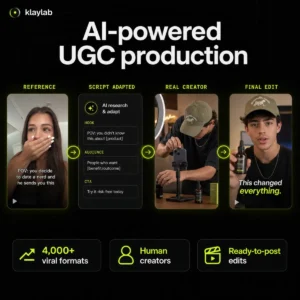
Klaylab turns a short brief or a TikTok or Instagram reference into finished UGC made by real creators. AI handles the early production work. It searches a library of more than 4,000 short form formats, adapts the script to your product, and matches the job with a creator. A human editor then cuts the footage, adds captions, and prepares the final exports. You can order two main types of content. Vibe videos pair a quick reaction with a product demonstration. Talking videos put a creator on camera with a full script. Both are filmed by people using real cameras, so the results sit closer to conventional UGC than avatar video. Projects are tracked inside Klaylab, with one revision included and final files prepared for TikTok, Instagram, and YouTube. This is a managed production service, so videos take days rather than seconds. Klaylab handles creator booking and payment, but it does not publish to your social accounts. It suits performance marketers, SaaS teams, and small brands that need a steady supply of creator ads without managing casting, scripts, editors, and invoices separately. The rights need a careful read. Paid deliverables are assigned to the customer, subject to any third party licenses, while you remain responsible for material supplied in the brief. A viral reference is useful creative direction, but it is not permission to copy someone else’s footage, music, trademark, or likeness. You can start with free script recreation, while human produced videos require a paid plan or order. Viral format research: Searches a library of more than 4,000 short form examples for formats that fit the brief. AI script adaptation: Rewrites a reference concept around your product, audience, hook, and call to action. Human creator matching: Assigns approved work to a real creator and manages booking and payment. Vibe videos: Combines a short creator reaction with a practical product demonstration. Talking videos: Uses a scripted creator to camera format for explanations, testimonials, and product pitches. Managed editing: Human editors cut the footage, add burned in captions, and prepare hook variants. Social exports: Delivers files ready for TikTok, Instagram, and YouTube. Project tracking: Keeps scripts, creator status, revisions, and finished files in one workspace. One revision: Includes one editing round before final delivery. Commercial rights: Assigns rights in paid final deliverables, subject to third party licenses and supplied material. Read more

Advertising Marketing Short Form Video Video Editing
Freemium
Visit Tool
LLMClicks

LLMClicks

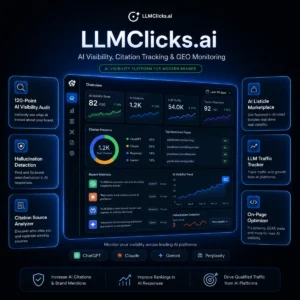
LLMClicks.ai is built for a problem that barely existed two years ago: your brand might show up wrong, or not at all, in AI-generated answers. When someone asks ChatGPT which tools to use in your category, and your brand is absent or described inaccurately, that’s lost business with no obvious fix in the traditional SEO playbook. LLMClicks.ai sets out to make that fixable. The platform runs what it calls a 120-point AI visibility audit across ChatGPT, Perplexity, Gemini, and Claude, checking not just whether your brand appears but whether what’s being said is accurate. Its hallucination detection flags cases where an LLM has got your pricing wrong, misattributed features, or invented claims outright. That’s a genuinely useful catch, especially for SaaS companies whose products get compared constantly in AI responses. The Citation Source Analyzer is another practical feature. It identifies which domains the major AI platforms actually cite when answering questions in your category, giving you a clearer picture of where to focus your content and link-building efforts if you want to be referenced more consistently. The most distinctive part of the product is its AI Listicle Marketplace. LLMClicks.ai connects brands directly with publishers running “Top 10” style articles that tend to be indexed and cited by LLMs. Rather than hoping your content organically ends up in those lists, you can pay for placement in publisher content already on AI radar. It’s a direct, paid approach to a visibility problem that organic tactics alone may not solve quickly. Daily tracking and alerting keeps you updated on shifts in how your brand is represented, and the LLM Traffic Tracker surfaces actual referral data showing how much traffic AI platforms are sending your way. There’s also an On-Page Optimizer that addresses schema, EEAT signals, and metadata to improve citation eligibility. The tool is built with agencies in mind. The upper tiers support multi-client project management, custom branding, and executive-ready reporting. Founder Shripad Deshmukh is a four-time SaaS founder, and the product reflects someone who has spent time managing client deliverables before. Pricing is structured as a one-time lifetime deal rather than a recurring subscription, which is unusual for a monitoring tool in this space. Three tiers cover solo operators up to agencies managing 30 projects. A 14-day free trial lets you test the auditing before committing, and a handful of free tools are available without any account required. For SEO agencies trying to show clients they’re covering AI visibility, or SaaS brands concerned about what ChatGPT says about them unprompted, LLMClicks.ai addresses a real gap in the current toolset. The review corpus is still thin given how recently GEO as a category has emerged, but the feature set is more complete than most early-stage tools in this space. Pros & Cons Pros (The Wins) Cons (The Friction) Value: One-time lifetime deal pricing vs. ongoing subscription costs. Data depth: Free tools lack detailed metrics. Workflow: Simple audit and tracking process. Agency reporting built in. Maturity: Relatively new product; limited third-party review data. Features: Hallucination detection is genuinely differentiated. Integrations: Analytics integrations still developing. Read more

AI Visibility SEO Marketing
Freemium
Visit Tool
Stivio

Stivio

Stivio turns a still photograph into a short AI-generated video. Upload one image, describe the movement and camera behavior in plain English, choose a model and clip length, then preview or download the result as an HD MP4. The current model menu includes Kling O3, Kling 2.6, Wan 2.6, MiniMax H3, Seedance 2.5, and Seedance 2.0. Switching models does not require a separate account with each provider, and Stivio shows the credit cost before you start a render. Clips can run from 3 to 30 seconds and follow the aspect ratio of the source image. Supported uploads include PNG, JPEG, and WebP files. The motion prompt can describe subject movement, camera direction, pace, and mood without using keyframes. This works well for turning a product photograph into a short listing video, adding movement to a portrait, creating social media B-roll, or animating an old family picture. A generated clip can be downloaded, shared through a stable link, or moved into another editor for music, captions, voiceover, and final assembly. New accounts receive enough free credits to test a short watermarked render. Paid plans remove the watermark and include personal and commercial use rights. Monthly subscription credits reset at the end of each billing cycle, while separately purchased top-up credits do not expire. Failed generations are automatically returned as credits. Stivio says uploaded images, prompts, and generated videos are not used for model training or sold for advertising. The image and prompt still need to be sent to the selected AI provider for rendering, and finished videos may remain available through Stivio’s CDN. Do not upload confidential client material, private photographs, copyrighted work, or identifiable people unless you have permission and accept the provider processing involved. Features Image-to-video generation from one photograph Plain-English motion and camera prompts Kling O3 and Kling 2.6 Wan 2.6 and MiniMax H3 Seedance 2.5 and Seedance 2.0 Clips from 3 to 30 seconds PNG, JPEG, and WebP uploads Source-image aspect ratio matching HD MP4 preview and download Stable sharing links for finished clips Credit price displayed before generation Automatic credit returns for failed renders Watermark-free output and commercial rights on paid plans Read more

Video Generation Generative Video Short Form Video
Freemium
Visit Tool
GitMind

GitMind

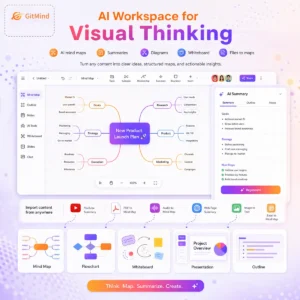
GitMind is an AI mind mapping and visual thinking workspace for turning scattered information into structured notes, diagrams, summaries, outlines, and presentation-ready maps. The product started with mind maps, but the current version reaches further. You can bring in a YouTube video, audio file, PDF, article, image, spreadsheet, or short prompt, then ask GitMind to extract the main points and organize them visually. It also includes AI flowcharts, UML style diagrams, whiteboards, OCR, article and PDF summarizers, podcast summaries, AI chat, and a Chrome extension for grabbing web content. GitMind works best when you need to understand or explain information, not just store it. A student can turn a lecture recording into review notes. A founder can turn a messy strategy doc into a map for discussion. A teacher can turn an article into a lesson structure. A project manager can sketch a plan, move branches around, and present the final map without rebuilding it in another tool. The tradeoff is that GitMind now covers a lot of ground. The interface has many entry points, and the pricing page separates basic mapping limits from paid plan features and metered credits. Teams should check export needs, collaboration limits, and AI credit usage before relying on it for daily work. 🛠️ GitMind: Pros & Cons Pros (The Wins) Cons (The Friction) Input Range: YouTube, PDFs, audio, images, articles, and spreadsheets. Learning Curve: Many AI tools and entry points can feel busy at first. Visual Work: Mind maps, flowcharts, outlines, whiteboards, and slides. Billing: Trustpilot includes refund and cancellation complaints. Reviews: G2 and Capterra feedback is broadly positive. Credits: AI usage and plan limits need checking before team use. AI mind maps from prompts, files, audio, images, articles, and spreadsheets YouTube video summarizer, transcript generator, podcast summarizer, and audio to text converter PDF summarizer, article summarizer, book summarizer, PDF translator, and quiz generator AI flowcharts, UML charts, class diagrams, sequence diagrams, and ERD diagrams Whiteboard, outline, slideshow, export, and cross device syncing AI chat, AI art generator, Idea Flow, GitMind Planet, and Chrome extension Free plan with paid Pro plan and metered credits Read more

Productivity Education AI Agents Business Intelligence
Freemium
Visit Tool
Miro

Miro

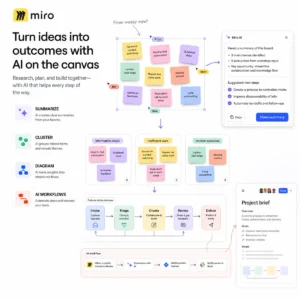
Miro is an AI-powered visual workspace where teams and their agents think, plan, and build together on an infinite canvas. The Miro workspace brings research, workshops, diagrams, documents, prototypes, and project planning into one shared board. The AI tools work against the context already on your board. You can summarize sticky notes, comments, and other board content, cluster ideas by keywords or sentiment, refine rough writing, translate text into 17 languages, and turn a description into a flowchart, process map, UML diagram, or entity relationship diagram. Images of diagrams can also be converted into editable structures. Miro’s AI Workflows extend that canvas into repeatable processes. Flows can turn a prompt into a sequence of actions, while Sidekicks provide specialized assistance inside the workspace. The same system can generate prototypes, docs, tables, slides, and diagrams, which is useful when a workshop needs to become a concrete plan without exporting everything into separate tools. Miro also has an MCP server for connecting the canvas to AI clients such as Claude, Cursor, GitHub Copilot, and Gemini CLI. That lets an external assistant read selected Miro context and send work back into the board. It gives teams a practical bridge between visual planning and agent driven execution, though the value depends on keeping board content organized and selecting the right context. The free plan is enough to try the canvas and includes up to three editable boards, a monthly allowance of AI credits, AI diagrams, tables, summaries, AI agents and workflows, and MCP connections. Paid plans add broader AI access, larger team workspaces, integrations, administration, security controls, and enterprise governance. Miro makes the most sense for product, design, research, education, and operations teams that need a visual place to make sense of messy input before turning it into structured work. AI summaries and synthesis: Summarize comments, sticky notes, and board content. AI clustering: Group research and workshop input by keywords or sentiment. Diagram generation: Create flowcharts, process maps, UML, and ER diagrams from text. Image to diagram: Convert an image of a diagram into editable objects. AI Workflows: Build repeatable Flows and use Sidekicks for focused assistance. AI content creation: Generate prototypes, documents, tables, slides, and diagrams. Writing and translation: Refine content and translate it into 17 languages. MCP connectivity: Connect Miro context to Claude, Cursor, GitHub Copilot, Gemini CLI, and other clients. Collaborative canvas: Combine workshops, research, planning, and delivery artifacts in shared boards. Alternatives to Miro FigJam: A collaborative whiteboard for brainstorming, workshops, diagrams, and product discovery inside the Figma ecosystem. Lucidchart: A diagramming workspace with stronger emphasis on structured process maps, technical diagrams, and business documentation. Whimsical: A lighter visual workspace for flowcharts, wireframes, mind maps, and quick collaborative planning. Read more

Productivity Design Generators Automation. Education
Free
Visit Tool
Artlist

Artlist

Artlist has been around for years as a royalty-free music and stock footage library, but it’s no longer just a place to grab a track or clip. It now comes with a full suite of generative AI tools: image, video, voiceover, and a creative asset library that’s very useful for people who make content for a living. If you’re a YouTuber, social media editor, in-house content team, or even a solo freelancer trying to produce polished client work without huge costs and studio time, Artlist is a solid option. How it works. Artlist combines traditional stock assets (music, footage, SFX, templates) with AI features like: Text-to-image generation — You type in a prompt, pick a style, and it spits out a visual. Good for storyboarding, thumbnails, or quick concept art. Image-to-video animation — Basically animates a still image into a short clip. Don’t expect Pixar here—it’s more Ken Burns with flair than full 3D motion. Text-to-video generation — Similar to Runway, you can generate simple videos from a prompt. There are different model tiers (Lite to Pro), and results vary based on how ambitious you get. Voice cloning and TTS — You can type a script or upload your own voice, and it’ll re-render it using an AI voice. There’s decent emotion control (angry, sad, optimistic, etc.), plus effects like “Vintage Radio” or “Walkie-Talkie.” Natural language search — You can look for clips and music by vibe, not just tags. For example, “sunset drone shot with mellow soundtrack” actually gets you somewhere. AI voiceovers as a Premiere Pro plugin — No need to leave your editor to generate narration. Artboards and AI suggestions — Organize visuals, then get curated asset suggestions that match your style or script. It’s like moodboarding with a brain. Real-World Use The AI tools are integrated well into the workflow. You can preview voiceovers with effects, fine-tune pacing with punctuation, or use phonetic spelling to fix weird pronunciations. The image tools let you blend up to 3 images or regenerate variants easily. For creators used to bouncing between 5 different tools, it’s nice to have all this in one place. Licensing and Ownership Everything you generate is covered for commercial use under Artlist’s licensing. That includes AI voiceovers and visuals. Still, if you’re cloning someone else’s voice—legally or ethically—think twice. The tools are powerful, but they don’t babysit your legal choices. Who This Is For YouTubers and content creators who want one tool for visuals, music, and voiceover Agencies or brands creating explainer videos, ads, or social clips at scale Freelancers tired of juggling 10 different subscriptions Video editors using Adobe tools who want voiceovers without exporting anything Bullet Point Features Text-to-image generation with 20+ curated visual styles Image editing and image blending (up to 3 images) Image-to-video animation (subtle motion clips from stills) Text-to-video generation with audio (Lite to Pro models) Text-to-speech voiceovers in 21+ languages with emotional tones Voice cloning and voice style transfer from uploaded audio Built-in voice effects (robotic, vintage, walkie-talkie, etc.) Adobe Premiere Pro plugin for in-editor voiceovers AI-powered asset search using natural language Artboards for asset organization and AI recommendations Commercial licensing included across all generated content Monthly credit system for generative features Read more

Generative Video
Freemium
Visit Tool
ClaimResolver

ClaimResolver

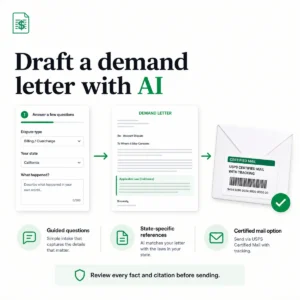
ClaimResolver is a US self-help workspace for organizing a consumer dispute before it reaches small claims court. You describe what happened in plain English, confirm the relevant facts, and receive an AI-assisted demand letter that you can edit before downloading the approved PDF. The nationwide demand-letter workflow covers security deposits, unpaid invoices and debts, refunds, service disputes, property damage, contract problems, and other straightforward claims. Your account keeps the letter, requested resolution, evidence, mailing order, delivery updates, and next actions inside one case record. The evidence organizer gives you one place for contracts, invoices, receipts, messages, screenshots, photographs, and other supporting files. That is useful when the dispute has developed across several conversations and payment records. It does not assess whether the evidence proves your case. ClaimResolver can send the approved letter through USPS Certified Mail and keep tracking events attached to the claim. A delivery record may document that something was mailed or delivered, but it is not automatically valid service of process. Court papers can require a sheriff, marshal, process server, clerk, or another method permitted by the relevant court. Court preparation currently starts with California. Supported workflows include California filing fields, an SC-100 draft, official-resource checklists, and a preparation record for post-judgment recovery. Users elsewhere can still create demand letters and organize evidence, but they should not expect court forms or procedures for every state. ClaimResolver is not a law firm and does not provide legal advice or representation. Its terms say AI-assisted output may be incomplete, inaccurate, outdated, or unsuitable for your circumstances. Read the generated letter line by line. Confirm the facts, amount, and deadline, then check recipient details, addresses, legal statements, and court rules separately. A demand letter, mailing record, evidence packet, or filing draft does not guarantee payment, settlement, a successful filing, judgment, or collection. The privacy policy says dispute descriptions, requested amounts, contact details, evidence, letters, and mailing information may be stored and processed to provide the service. PostGrid receives the letter PDF and mailing details when you order delivery. Avoid uploading passwords, full payment-card details, Social Security numbers, or unrelated confidential information. The editable demand-letter PDF is available free. Certified Mail and other optional services can carry separate charges that are shown before purchase, making the overall pricing model freemium. Features Plain-language intake for consumer and small-claims disputes AI-assisted demand-letter drafting Editable English letter and downloadable PDF Evidence storage for contracts, invoices, receipts, messages, screenshots, and photographs Connected case history and next actions Optional USPS Certified Mail delivery and tracking California SC-100 preparation fields and filing checklists California-first post-judgment recovery preparation Google account sign-in Read more

Productivity Copywriting Automation
Freemium
Visit Tool
Demand Letter

Demand Letter

Demand Letter is a US legal self-help tool that turns the facts of a dispute into a formal demand letter. A guided AI assistant asks what happened, who is involved, what you want the recipient to do, and which state applies. It then prepares a structured letter with legal references matched to that state. The templates cover common disputes involving security deposits, unpaid invoices, contractors, personal loans, wages, property, and service providers. You can preview the draft, check the names, dates, amounts, supporting records, requested remedy, and response deadline, then download it or arrange delivery through USPS Certified Mail. The guided AI intake is more useful than a blank template when you are unsure what details belong in the letter. Its state-specific references may also help you identify relevant consumer or tenant rules. They still need checking. A statute can be outdated, inapplicable, or interpreted differently when important facts are missing. Demand Letter is not a law firm, and using it does not create an attorney-client relationship. Its terms warn that generated text may contain factual, legal, or procedural errors. Treat the result as an editable first draft. Check every fact and citation, confirm any notice or delivery requirements, and speak to a licensed attorney when the dispute is complex, valuable, close to a filing deadline, or likely to reach court. The privacy policy also matters because case details can include personal, financial, and legal information. The company says personal case details are not used to train its AI models, although service providers may process data for hosting, AI inference, payments, identity checks, and document delivery. Do not upload more sensitive information than the letter requires. Drafting and previewing are available at no charge. The terms describe one-time fees for document export and physical mailing, despite broader free wording elsewhere on the site, so check the final checkout screen before relying on a specific option. Features Guided AI interview for collecting dispute facts US state selection and state-specific legal references Templates covering several common dispute types Editable demand letter preview Document download and export Optional USPS Certified Mail delivery with tracking Examples and state law guides for common demand letter situations Read more

Productivity Copywriting Automation
Freemium
Visit Tool
Getsolved

Getsolved

Getsolved brings AI detection, rewriting, grammar correction, originality checks, summarisation, fact checking, and document chat into one browser workspace. You can paste text or upload a document, choose the relevant tool, and review the result without moving the draft between several websites. The AI detector highlights sentences that appear machine written and provides model-level confidence information for text associated with GPT, Claude, and Gemini. Downloadable reports include the scan result, sentence analysis, word count, and detector version. Longer documents are divided into smaller sections for analysis. Editing and originality tools The Text Improver looks for stiff wording, repeated phrases, awkward flow, and tone problems. The humanizer and paraphraser can rewrite sections while trying to preserve the original point. Grammar and punctuation tools address conventional writing errors, while the summariser condenses longer material. These features are useful when you treat the output as an editable suggestion. Rewritten text can still change a qualification, weaken a citation, introduce an error, or make every paragraph sound alike. Students should follow their institution’s AI and authorship rules rather than using the humanizer to disguise prohibited assistance. The originality checker identifies overlapping or reused passages. It can help locate text that deserves a citation or another revision, but a similarity match does not automatically mean plagiarism. Quotations, references, common phrases, templates, and technical language can produce legitimate overlap. Getsolved also includes a fact checker and AI chat. Chat accepts PDF, DOC, and TXT files, can work with a website, and can search the web. Fact checking is a useful first pass, not a substitute for opening the cited source and confirming that it supports the exact statement. Key features AI-generated text detection Sentence-level detection highlights GPT, Claude, and Gemini attribution Downloadable detection reports DOCX and other document uploads AI text improvement AI humanizer and paraphraser Grammar and punctuation checking Originality and similarity checking Plagiarism checking AI summarisation AI fact checking Chat with PDF, DOC, and TXT files Chat with websites Web search inside AI chat Limited free access with paid subscriptions Read more

AI Detection Copywriting Productivity Education
Freemium
Visit Tool
GetGenie

GetGenie

GetGenie combines AI writing, keyword research, competitor analysis, content optimization, AI search preparation, and performance reporting inside WordPress. A separate Playground provides many of the same research and writing tools outside the WordPress dashboard. The Blog Wizard starts with a target keyword and builds the research behind the article. It surfaces related, NLP, and semantic keywords, then examines current search results for competitor headings, content length, images, and page structure. Head to Head analysis compares pages directly, while topical maps help plan supporting content around a larger subject. You can use that research to create a complete first draft with the One Click Blog Generator or build the article section by section. The editor provides live content guidance based on keyword coverage, headings, images, topical depth, and other page elements. AI writing extends beyond articles. GetGenie includes more than 40 templates for product descriptions, advertising copy, social posts, email, Google Business Profile posts, local service pages, FAQs, and other marketing material. Genie Mode accepts open prompts, while GenieChat provides a conversational assistant with different working personas. Boss Mode adds voice prompts to Genie Mode and GenieChat. Role controls determine which WordPress users can access AI writing, keyword research, and reporting features. Genie Image creates supporting visuals that can be inserted into WordPress content. The AI Overview Answer Builder creates concise, answer first sections for topics that may appear in Google AI Overviews. The AI FAQ Generator produces question and answer sections that can make a page easier for search engines and AI systems to interpret. GetGenie also provides a live AI Readiness Score. It examines NLP coverage, topical authority, headings, images, and page structure while you write. This is a content guidance score. It cannot prove that ChatGPT, Perplexity, Gemini, or Google AI Overviews will cite the finished page. SEO Insights connects content work to performance data. It tracks new, improved, declining, and lost keywords, identifies pages losing traffic, and surfaces terms where an existing page may be close to improving its position. Google Analytics integration adds reporting for traffic arriving from AI services, organized by source, page, and date. The Google Business Profile Post Generator and Local Service Page Copy Generator make GetGenie particularly relevant to US local businesses and marketing agencies. An HVAC company, dentist, attorney, landscaping service, or home repair business can create location based service copy and supporting Google Business Profile posts from the same workspace. There is no US exclusive version. Search demand, terminology, and local intent still vary considerably between states and cities. Check generated service claims, licensing language, pricing statements, and geographic references before publishing. WooCommerce users can generate product titles and descriptions inside WordPress. Agencies can manage several client sites, while the Playground gives writers and strategists a browser based workspace when they do not need to work directly inside a client’s CMS. GetGenie has a free version with limited generation and research allowances. Paid plans increase AI writing, keyword research, SERP analysis, topical map, image generation, site tracking, and team usage limits. The pricing model is based on usage allowances rather than access to a separate model API key. Its WordPress.org reviews are broadly positive, particularly around the combined writing and research workflow. Critical feedback mentions generic phrasing, uneven non English output, limited free credits, and the inability to connect a personal model API key. Generated articles still need fact checking, source review, and a human editing pass. The plugin changelog includes recent security fixes covering authorization, site token exposure, and cross site scripting. Install the current release and keep it updated, particularly on WordPress sites where several users can access content or SEO data. GetGenie: Pros & Cons Pros (The Wins) Cons (The Friction) Connected workflow: Research, writing, scoring, and tracking stay together. Citation uncertainty: AI readiness cannot guarantee AI citations. WordPress access: Research and draft without leaving the editor. Editing required: Drafts can contain generic or repetitive language. AI search features: Overview answers, FAQs, and AI traffic reporting. Usage allowances: Research and generation limits vary by plan. Local SEO content: Service pages and GBP posts support local teams. No personal API key: You use GetGenie’s credits rather than your own model. Key features NLP, semantic, and related keyword research SERP competitor analysis and content gap research Head to Head page comparisons AI generated topical maps One Click and step by step blog creation Live AI Readiness and content guidance AI Overview Answer Builder AI FAQ Generator Google Business Profile Post Generator Local Service Page Copy Generator More than 40 AI writing templates WooCommerce product copy GenieChat with specialized personas Voice prompting through Boss Mode AI image generation inside WordPress Google Search Console keyword tracking Google Analytics reporting for AI referral traffic Browser based Playground WordPress role management Read more

SEO AI Visibility Copywriting Productivity
Free Visit Tool
InLinks

InLinks

InLinks is an SEO tool that provides Entity-based Page & Site Optimization, Automated Internal Linking, Broader & Deeper Keyword Research, and Comprehensive Content Briefs. It uses an automated schema markup to better understand the main entities of the content so search engines can understand them. InLinks is an SEO tool. It focuses on something called “entity-based SEO.” Think of entities as specific concepts or “things” – like a person, a product, or a city – not just keywords. The idea is that search engines like Google are getting smarter about understanding the actual meaning and context of your website’s content. InLinks uses AI, specifically Natural Language Processing (NLP), to figure out these entities on your site. It then uses this understanding for several tasks. Key AI-Powered Features Here’s how InLinks uses AI: AI Writing Assistant: This isn’t just another AI writer. Before it even generates text (using OpenAI’s tech, by the way), InLinks analyzes the top-ranking search results for your target topic. It then creates a detailed content outline with headings and key points. You use this outline to guide the AI, so the content it produces is structured for SEO and covers important entities. You can then edit it, watching an SEO score change in real-time. note: Generic AI content often misses the mark for SEO. Guiding the AI with a SERP-analyzed outline is a solid approach. You’ll still need to edit and inject your brand’s voice, but it’s a starting point. Intelligent Content Optimization: As you write or edit, InLinks scores your content. It also shows you entities your page might be missing based on its knowledge graph and what competitors are covering. It looks at the top 10 Google results for your topic, identifies what they cover, and shows you gaps. It also clusters keywords by topic, which is more useful than a raw list. NLP-Driven Automated Internal Linking: Manually adding internal links is tedious. InLinks says its NLP understands the meaning of your pages and then automatically adds relevant internal links. It aims for natural-sounding anchor text, not just stuffing keywords. This usually involves adding a line of JavaScript to your site. Audience Finder & Named Entity Analyzer: It offers a tool to analyze what “tribes” or types of people might search for a phrase, going beyond basic demographics. The Named Entity Analyzer (free for limited use) scans a webpage, identifies entities, and can compare its findings to Google’s public NLP output. It also suggests schema markup, which is code that helps search engines understand your entities. The Named Entity Analyzer is a good way to dip your toes into entity SEO without commitment. Understanding how Google (and InLinks) “sees” your page entities can be revealing. Automating schema is a plus for paid users. How This Helps You, The Entrepreneur If you’re a small business owner or indie hacker, you’re likely juggling many tasks. Saves Time: Automating content outlines, first drafts, and internal linking can free you up. Better Content Structure: The focus on entities and SERP analysis for outlines can lead to content that’s more comprehensive and better understood by search engines from the get-go. Competitive Insights: Understanding what your competitors rank for, and the topics they cover, gives you a roadmap to create better content. Improved Site Structure: Good internal linking helps search engines understand your site’s important pages and spreads link equity. The core idea is to build topical authority. By thoroughly covering entities related to your business and interlinking them properly, you signal to search engines that you’re a knowledgeable source. InLinks states a case study where a US company saw a “+440% in impressions and +52% in clicks 3 months after using InLinks,” attributing this to the AI Assistant and entity-optimized content. Those are significant numbers. Read more

SEO
Freemium
Visit Tool
Buzz

Buzz

Buzz is an open source workspace from Block (founded by Jack Dorsey of Twitter fame) where people and AI agents work in the same project channels. A developer can discuss a change with teammates, hand part of the job to an agent, review the resulting pull request, and keep the surrounding conversation attached to the work. Agents appear as named participants rather than anonymous background processes. Each agent has its own identity and cryptographic keypair, so messages and actions can be attributed to the participant that produced them. Buzz records activity as signed Nostr events, giving teams a verifiable project history across conversations, files, workflows, and code reviews. The interface resembles a team chat app. It includes channels, threads, direct messages, search, media comments, canvases, projects, and an audit log. Git events can appear inside the relevant conversation, which keeps implementation decisions and review feedback beside the code change. Teams can also define repeatable work in YAML workflows and connect compatible coding agents through ACP. Buzz is still a developer preview. The product is moving quickly, and public discussion is mostly coming from early technical users rather than long term production teams. Expect rough edges, changing workflows, and more setup than a mature collaboration suite. The hosted service is available free, and the code can be self hosted. Teams handling confidential work should review the deployment and data model carefully. Hosted content is not end to end encrypted, even though signed events provide authorship and tamper evidence. Features Shared channels for people and AI agents Separate identities and cryptographic keypairs for agents Signed Nostr event history Channels, threads, direct messages, canvases, and media comments Git events, pull request context, and human review YAML workflows for repeatable jobs ACP support for compatible coding agents Search and audit tools Hosted communities and self hosted relay options Open source code from Block Read more

Ai Agents Productivity Automation Coding
Free
Visit Tool
1 2 3 9

Vellow AI is a modern AI tools directory built for creators, businesses, marketers, developers, students, and professionals looking to discover the latest AI software in one place.